


VA Video Connect
4.41.81K Reviews
App Specs
- Version
- 1.12.10
- Updated On
- License
- Free
- Downloads
- 500,000+
- Developer
- US Department of Veterans Affairs (VA)
- Categories
- Medical
- Platform
- Android, iOS
Screenshots
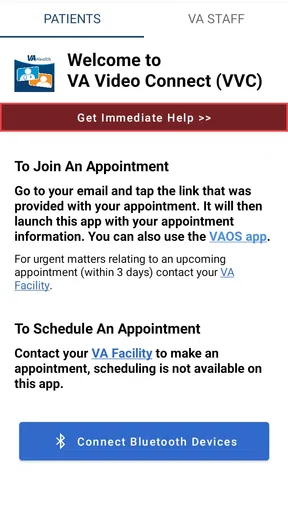
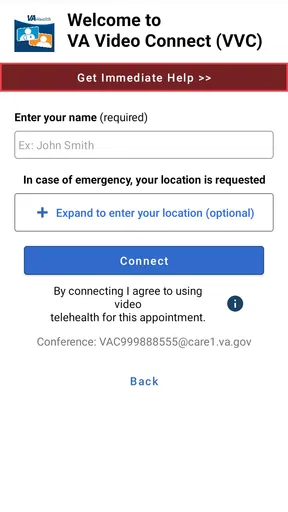
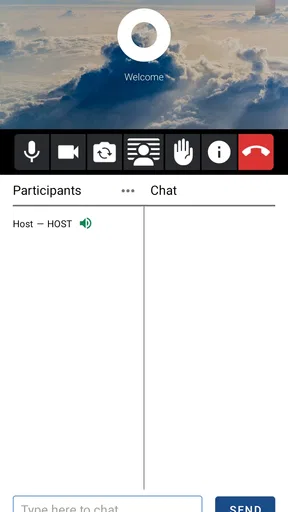
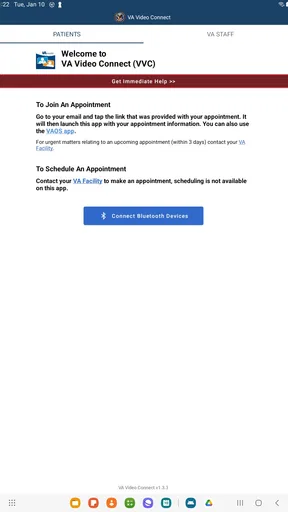
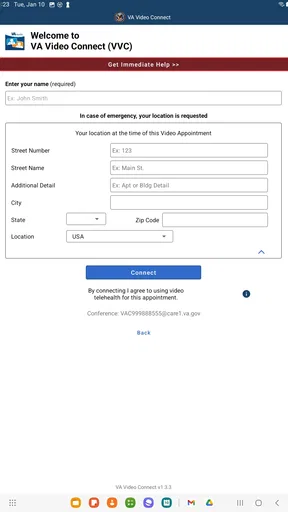
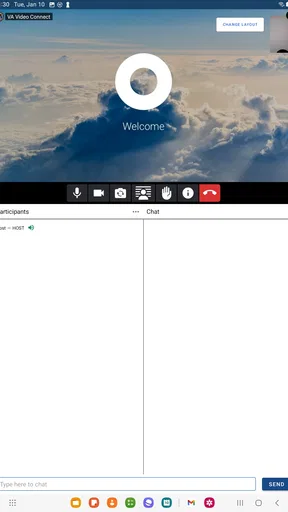
 Analysis by AppCompare
I look at VA Video Connect as a focused medical app rather than another general-purpose video meeting tool. Its job is to help people connect with their VA care team remotely, so the value depends less on a long feature checklist and more on whether a video visit fits the appointment and the person’s circumstances. I’d consider it when travel, distance, or getting out of the house makes an in-person conversation harder, while remembering that a screen cannot replace every kind of care.
Who benefits from a VA-focused visit
The clearest audience is someone who already receives care through the VA and has been offered a video appointment. A veteran who lives far from a clinic, has difficulty arranging transportation, or needs a follow-up conversation may find it useful to speak with the care team from a familiar place. It can also be a practical option for a caregiver who helps someone prepare for an appointment, provided the care team has arranged the visit in a way that works for them.
That focus is also a boundary. I would not treat this as a replacement for a general video-calling app for family, work, or social calls, nor assume that downloading it alone creates access to VA care. The app is most useful as part of an appointment with the VA team, not as a way to choose any clinician or start an unscheduled consultation. If you are not receiving VA care or do not have a video visit arranged, a regular video app may be more relevant for your needs.
A more realistic appointment workflow
Imagine a follow-up that does not require an examination in person. Rather than making a trip solely to discuss how things have been going, you could set aside a quiet spot at home, keep your phone charged, and join the scheduled visit. Beforehand, I would write down symptoms, medication questions, and anything that has changed since the last conversation. That small bit of preparation helps keep a remote appointment focused; it is easy to remember a question only after the call ends.
I would also think through the room, not just the app. A private place matters for a medical conversation, and a stable seat and decent light make it easier to hear and be heard. If another person needs to help with the device, it is worth arranging that before the appointment rather than asking them to troubleshoot in the middle of a sensitive discussion. These are simple steps, but they address the practical friction that video visits can shift from the clinic to the patient.
What video care can and cannot do
A remote conversation can make it easier to talk through concerns without travel, but it is not interchangeable with every appointment. Some issues call for a physical examination, tests, or hands-on care; in those cases, an in-person visit is the sensible choice. I would follow the care team’s guidance about which format fits, rather than choosing video solely because it is more convenient.
There is another trade-off: a clinic visit has staff and equipment nearby if something needs attention, while a video appointment depends on the patient’s device and connection. If the picture or sound becomes unreliable, the conversation may be harder to follow. I’d have the appointment details readily available and know how to contact the care team through the usual route if joining becomes a problem. That is not a criticism unique to this app; it is a limitation of relying on a remote appointment at all.
Worth Reading Before You Choose

EA SPORTS FC Mobile 26 Is a Bigger Football Game, but It Takes Time

Flipboard Shows What News Apps Must Do Beyond the Feed

Switching to Android Auto Means Rethinking Your Driving Routine

Google Calendar Makes a Crowded Week Easier to Manage

Ludo King Makes the Most of the Minutes Between Plans

Baby Panda World Brings Quick Play to Modern Phones, but Its Game Library Feels Busy
Getting Started with Ease
The first thing I noticed when I downloaded VA Video Connect was how simple it was to set up. Seriously, no lengthy sign-up process or complicated instructions. Just download, install, and you’re ready to go. It’s like the app knew I didn’t have time to mess around with endless settings. Perfect for those of us who like things straightforward.
User-Friendly Interface
The layout of the app is super intuitive. Everything is right where you’d expect it to be. The main screen provides quick access to starting or joining a meeting, and the navigation bar at the bottom keeps it all organized. Even if you’re not the most tech-savvy person out there, you’ll find your way around in no time.
Video and Audio Quality
Here’s where VA Video Connect really shines. The video quality is crisp, and even on a not-so-great connection, it manages to keep everything smooth. The audio is clear too; no more straining to hear your colleagues or repeating yourself ten times. It’s like having a face-to-face conversation, minus the coffee breath.
Features That Stand Out
Now, let’s talk about the cool stuff. The app offers some nifty features that make it stand out from the crowd:
- Screen Sharing: Need to show a presentation or collaborate on a document? The screen sharing feature is seamless and doesn’t lag.
- Virtual Backgrounds: Not a fan of your messy room being on display? Choose from a variety of virtual backgrounds to keep things professional.
- Meeting Recording: Forgetting key points from a meeting is a thing of the past. You can record sessions and revisit them whenever needed.
Security and Privacy
In today’s world, security is everything, right? You’ll be glad to know that this app takes your privacy seriously. With end-to-end encryption, your conversations stay just between you and the people you’re talking to. No unwanted eavesdroppers here!
Compatibility and Accessibility
Whether you’re using an Android device or an iOS gadget, VA Video Connect has got you covered. It’s compatible with multiple devices, so you can switch from your phone to your tablet or laptop without a hitch. Plus, the app is designed to be accessible, with features like closed captioning to ensure everyone can participate.
What to check before appointment day
For a smoother visit, I would not wait until the appointment starts to find out whether the phone is ready. Check that the device can run the app, install the current release, and make sure you can open the appointment information you were given. The current version is 1.12.9, and the minimum operating system is 10, so an older device may need attention before you plan around a video visit.
A useful, often overlooked step is to decide in advance what you will do if the device is shared. A family member’s phone may be convenient, but medical conversations call for a private setting and a clear understanding of who will be present. If you rely on someone else to help, ask them to be available before the visit begins and keep the conversation itself centered on what you want to discuss with your care team.
It is also sensible to keep a short written list nearby rather than relying on memory or trying to type notes while listening. I would put the main concern first, then any questions that would be disappointing to forget. For a visit where a caregiver is involved, agreeing beforehand on which points they should help raise can prevent the appointment from turning into a device-support session.
How it compares with ordinary video-call apps
General video-call apps are built for flexible calls with friends, colleagues, and groups. VA Video Connect has a narrower purpose: a VA care-team visit. That specialization is its main practical distinction, not a reason to use it for every conversation. A familiar social app may be easier when you simply want to call a relative; for care arranged through the VA, the dedicated option is the one to consider because the appointment is tied to that service.
I would not compare the two by counting meeting extras. A feature that is helpful for a work presentation may have little value in a medical appointment, where being able to hear the clinician and discuss concerns matters more. Nor should the availability of a video app be taken to mean every clinical need can be handled remotely. The format should suit the appointment, and the care team is the right point of contact when a patient is unsure.
Cost, trust, and the practical trade-off
The app is free, which makes trying it for an arranged visit a low-cost decision. That tells me the download itself does not carry a purchase price; it does not settle every possible cost associated with a phone plan, internet access, or care outside the app. I would separate those everyday connectivity expenses from the app’s price rather than assume a free download makes the whole process cost-free.
The VA Department of Veterans Affairs develops it, and it is listed as a medical app for everyone. Its average rating is 4.5 from around 9,500 ratings, with about 1,700 written reviews and more than 500,000 installs. Those figures suggest it has found an audience, but they cannot tell me whether a particular appointment will run smoothly or whether a person’s device and connection are suitable. I’d treat public feedback as context, not a guarantee.
The important trade-off is convenience versus dependence on technology. Avoiding a trip can be a real benefit, but a weak connection, an unfamiliar device, or a lack of privacy can make a video visit more stressful than helpful. If the patient would spend the whole appointment worrying about the screen or cannot speak freely where they are, asking the VA team about another arrangement may be better than forcing a remote visit.
Who should install it, and who can skip it
I’d recommend considering it if you are a VA patient with a scheduled video visit, use a compatible device, and can find a reasonably private place to talk. It may be especially helpful for routine follow-ups where conversation is central and travel is a burden. People who are comfortable with a phone but not especially technical can still prepare in advance and ask a trusted helper to be nearby for setup.
I would skip it for now if you have no VA video appointment, need a general-purpose calling tool, or have a health concern that requires urgent or hands-on attention. It is also not a magic fix for limited connectivity or an outdated device. In those cases, contacting the care team through an established channel to discuss the appropriate format is more useful than assuming the app alone will solve the problem.
For anyone wondering whether the app replaces an in-person appointment, my answer is no: it supports a remote option when that format fits the care. If you are unsure whether a particular concern can be handled by video, ask the VA team. If you are wondering whether you need a new device, check the operating-system requirement first and use a device that can run the app; the experience still depends on the connection and setting you have available.
Wrapping It Up
All in all, I’ve been pretty impressed with VA Video Connect. It’s user-friendly, reliable, and packed with features that genuinely enhance the virtual meeting experience. If you’re in need of a solid video conferencing tool, give this one a shot. You might just find it’s exactly what you’ve been looking for to keep those connections strong, no matter the distance.
My recommendation is narrower than that final pitch suggests: this is worth considering for VA patients whose care team has arranged a video visit, not as a universal conferencing app. It is free to download, made for a specific medical purpose, and most valuable when the appointment is suitable for a conversation and the patient has a private, workable setup. If travel is difficult and the format fits, I’d give it a try; if the issue needs hands-on care or the technology creates more strain than convenience, an in-person or otherwise arranged option is the better call.
Pros
- User-friendly interface for easy navigation.
- High-quality video and audio support.
- Secure connections for privacy protection.
- Cross-platform compatibility enhances accessibility.
- Reliable customer support available 24/7.
Cons
- Occasional connectivity issues reported.
- Requires a stable internet connection.
- Limited features in the free version.
- Consumes significant battery power.
- Initial setup can be slightly complex.
FAQs for VA Video Connect
What is VA Video Connect and how does it work?
VA Video Connect is a telehealth app designed for veterans, allowing them to connect with their healthcare providers via secure video conferencing. Users can schedule virtual appointments, attend meetings, and communicate with their medical team all from the comfort of their home. The app is compatible with both Android and iOS devices, ensuring flexibility and accessibility.
Do I need any special equipment to use VA Video Connect?
To use VA Video Connect, you need a smartphone or tablet with a camera and a stable internet connection. The app is available for both Android and iOS platforms. Ensure your device is updated to the latest OS version for optimal performance. Headphones or earbuds may enhance your audio experience during calls.
Is VA Video Connect safe and secure for my medical appointments?
Yes, VA Video Connect is designed with security in mind, utilizing encryption to protect your personal health information during video calls. The app complies with federal security standards to ensure your privacy and confidentiality are maintained, offering veterans a safe environment to discuss their healthcare needs.
Can I use VA Video Connect for all my medical appointments?
While VA Video Connect is suitable for many types of medical appointments, some situations may require in-person visits. It's best to consult with your healthcare provider to determine if a video appointment is appropriate for your specific needs. The app is ideal for general consultations, follow-ups, and mental health support.
How do I troubleshoot common issues with VA Video Connect?
If you encounter issues with VA Video Connect, first check your internet connection and device compatibility. Ensure the app is updated to the latest version. Restarting your device can resolve minor glitches. For persistent problems, contact VA technical support for assistance. They can guide you through troubleshooting steps or address any app-related concerns.


